5 simple ways to add Social Bookmarks in every post !!

Posted by Unknown on Apr 11, 2009

For most of us bloggers nothing can beat the joy on seeing a post Dugg, Stumbled, faved on technorati or bookmarked in delicious. I missed the Feed count, right.

But then I also missed scores of other equally important social bookmarking and networking sites. That's the point, we need to make sure that we don't miss out on anything and at the same time not overdo the whole thing.

Here are some of the simplest and best implementations of Social Bookmarks.
Pick yours ....

1. We can apply this one at the footer of each post Find it at Smartbloggerz


2. This is the text version, to go with every post of ours. Find it at TechieBlogger

3. Taller ones, this is a new compilation by MoreTechTips


4. Bigger is better, a Bloganol effort.

5. A wonderful and simple to implement widget by Sociofluid


Find another interesting compilation of multiple social bookmaark widgets by EazyCheezy

If you think there are better ways to do this, share and Disqus....
More about → 5 simple ways to add Social Bookmarks in every post !!

The Best Movies Ever : Make your own list !!

Posted by Unknown on Apr 10, 2009

I just love to do this Friday Movie Post. Yesterday I had a discussion with my friends about whether they can make up their mind as to which is the best movie they have ever seen ( when I say best I MEAN ONE !! ).

We often find lists like the " top 10 hollywood movies of all time " or titles like " one movie you must see before you die " ( hope I see a lot more before I do die ).

But then when I try to figure out my pick for the best movie ever I just can't think of 1, not even 5 or 10 ( beyond that my mental reserves get exhausted !! ).
I was looking at my Orkut profile yesterday ( which I created 4 years back and is pretty much unchanged ) and I found that there too I have written " too many to list" in the favourite movie section !!

Many a times while I'm watching a movie I feel this one is going to be the best I have ever seen but a day later when the side-effects have rubbed off I realise it's not.

Tell me your favourite 1, 5 or 10 movies. Atleast that way I will get to see a few more to decide about mine.

Here are some of the best movie lists we can refer to make up our mind :


5. New York Times 1000 best ( I guess we can decide on 1000 movies when we see that many !!)

The list of movies I have seen till date. It hasn't been updated for last two months but I guess that's okay.

So, make up your mind and when you do, tell me !!
More about → The Best Movies Ever : Make your own list !!

7 Best Gmail Labs Features : Try Them !!

Posted by Unknown on Apr 8, 2009

Heard about Gmail Labs?? I guess many of us haven't. It's the place to test Gmail features being developed and which will be an integral part of Gmail in future.
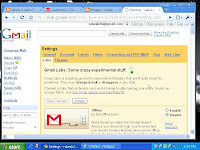
So, why not try them before others do. All we have to do is :

1. Goto Gmail Setting and click on the Labs tab.
2. Enable the Gmail Lab feature we want and save changes.

As simple as this. In case something goes wrong :

1. Disable the particular Lab feature the same way we enabled it.
2. To disable Gmail Labs completely go here http://mail.google.com/mail/?labs=0.

Here are my picks for the best of Gmail Labs :

1. Title Tweaks by Fedor K

Changes order of elements in the browser title bar from "Gmail - Inbox (20) - rakesh2b@gmail.com" to "Inbox (20) - rakesh2b@gmail.com - Gmail". This way we are able to see if a new mail has arrived even if Gmail window is minimized.

2. Undo Send by Yuzo F

Can you believe it !! We can now stop messages from being sent for a few seconds after hitting the send button. My pick for the best Gmail Lab feature.

3. Superstars by Kai H & Julie W

We need to do a few things to get this one right.

Adds additional star icons. After enabling this feature:
1. Go to the "General" Settings page to choose which superstars you wish to use.
2. Use either the keyboard shortcut ('s') or click to rotate through your selected superstars.
3. Use the search operator "has:" to find all messages with your superstar (e.g. "has:red-bang", "has:blue-star"). Learn the name of a superstar by hovering over its image in the "General" Settings page.

4. Pictures in chat by Dave C

We can see our friends' profile pictures when we chat with them.

5. Signature tweaks by Keith C and Dave C

Places our signature before the quoted text in a reply, and removes the "--" line that appears before signatures.

6. Random Signature by Chad P

Rotates among random quotations for our email signature.

7. Location in Signature by Marco B

Appends our location to your signature. We must have your signature enabled.
A signature can be anything from a quote to your website's address which will appear in evry mail you send. To enable it GoTo Gmail Settings, General Tab and type in your Signature.

So, get started. Make your Gmail your own and unique and at the same time contribute to it's development.

More about → 7 Best Gmail Labs Features : Try Them !!

Wi-Fi and Bluetooth : Simple to learn Wireless !!

Posted by Unknown on Apr 7, 2009

Wireless networks are the future of seamless connectivity. Already we are used to various Bluetooth enabled gadgets and accessing internet in Wi-Fi enabled zones. In this post let's try to simplify these technologies for a better understanding.

is for resident equipment and its applications and is intended as a replacement for cabling for general local area network access in work areas. The category of applications is outlined as WLAN, the wireless local area networks.

Wi-Fi is a trademark of the Wi-Fi Alliance for certified products based on the IEEE 802.11 standards. This certification warrants interoperability between different wireless devices.

Wi-Fi is often used for wireless internet (WLAN ), but actually every product does not have the Wi-Fi certification and hence not all WLAN's are Wi-Fi.
Wi-Fi is supported by most personal computer operating systems, many game consoles, laptops, smartphones, printers, and other peripherals.

Through interconnected access points (hotspots) Wi-Fi can lead to connectivity over large square miles of area, though a typical Wi-Fi home router has a range of 32 m indoors and 95 m outdoors.

Bluetooth is an open wireless protocol for exchanging data over short distances from fixed and mobile devices, creating personal area networks (PANs).

Bluetooth is intended for non resident equipment and its applications. The category of applications is outlined as the wireless personal area network (WPAN). Bluetooth is a replacement for cabling in a variety of personally carried applications.

Bluetooth has a range of less than 10m for gadegts we use (class II device), but it can go upto 100m (class I device). The current version of Bluetooth is 2.1

Next version Bluetooth 3.0 (codename Seattle ) is expected to be released this year which will allow use of Bluetooth over UltraWideBand ( UWB) radio, and data transfer upto 480 Mbit/s.

I guess it's enough for the day. Now we can keep an eye on the future developments in Wireless Connectivity in a more informed way !!

More about → Wi-Fi and Bluetooth : Simple to learn Wireless !!