Home » Posts filed under how to simply
Posted by
Unknown on Apr 8, 2009

Heard about
Gmail Labs ?? I guess many of us haven't. It's the place to test Gmail features being developed and which will be an integral part of Gmail in future.
So, why not try them before others do. All we have to do is :
1. Goto Gmail Setting and click on the Labs tab.
2. Enable the Gmail Lab feature we
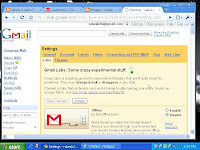
want and save changes.
As simple as this. In case something goes wrong :
1. Disable the particular Lab feature the same way we enabled it.
Here are my picks for the best of Gmail Labs :
1. Title Tweaks by Fedor K
Changes order of elements in the browser title bar from "Gmail - Inbox (20) - rakesh2b@gmail.com" to "Inbox (20) - rakesh2b@gmail.com - Gmail". This way we are able to see if a new mail has arrived even if Gmail window is minimized.
2. Undo Send by Yuzo F
Can you believe it !! We can now stop messages from being sent for a few seconds after hitting the send button. My pick for the best Gmail Lab feature.
3. Superstars by Kai H & Julie W
We need to do a few things to get this one right.
Adds additional star icons. After enabling this feature:
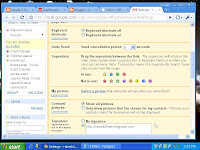
1. Go to the "General" Settings page to choose which superstars you wish to use.
2. Use either the keyboard shortcut ('s') or click to rotate through your selected superstars.
3.
Use the search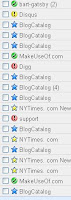 operator "has:" to find all messages with your superstar (e.g. "has:red-bang", "has:blue-star"). Learn the name of a superstar by hovering over its image in the "General" Settings page
.
4. Pictures in chat by Dave C
We can see our friends' profile pictures when we chat with them.
5. Signature tweaks by Keith C and Dave C
Places our signature before the quoted text in a reply, and removes the "--" line that appears before signatures.
6. Random Signature by Chad P
Rotates among random quotations for our email signature.
7. Location in Signature by Marco B
Appends our location to your signature. We must have your signature enabled.
A signature can be anything from a quote to your website's address which will appear in evry mail you send. To enable it GoTo Gmail Settings, General Tab and type in your Signature.
So, get started. Make your Gmail your own and unique and at the same time contribute to it's development.
Posted by
Unknown on Apr 1, 2009
 P
rotecting our PC's from virus, trojans, spyware, malware.... is top on most people's mind. I have seen people getting real paranoid, linking everything wrong with their PC's to a virus problem instead of identifying what's really wrong.
I believe we don't really need to pay for antivirus and antispyware. Not for our Personal Computers, though it makes sense for an organization to go for it. Just get the right combination of free antivirus and antispyware installed. We tend to think that free antivirus softwares are not that effective, but....
Believe me, they are really effective and they don't even take a toll on your computer's memory like some of the highly rated antivirus's that cost.
Following are the best free antivirus/ antispyware softwares : A Simple2Learn presentation.
Antivirus
1.
AVG antivirus 
: I guess it needs no introduction and it's really effective. Just keep it updated.
2.
Avira antivirus 
: Another one that works really well and is really free.
Antispyware
1.
Spybot antispyware : A very effective spyware and absolutely light on your system.
2.
Ad aware antispyware : Another top of the line free software. You can upgrade it if you want but the free edition is good enough.
Just install one antivirus and one antispyware each and stop fussing. I prefer AVG antivirus with Spybot. Just keep them updated and those of you who have been using the obvious highly rated antiviruses will finally get to feel what it is like to have softwares that don't take all your system's memory.
And yes please remember any antivrus protection is mostly preventive. So there is absolutely no point in cursing the software if we install it after the damage has been done. Install them beforehand : prevention is better than cure ( cliche but so true !! ) .
Posted by
Unknown on Mar 30, 2009
 T
his "
Symbian Monday " post is not really an exclusively Symbian post. This one is also for the Ipod and other video freaks who want to convert video to formats that that would run on their gadgets.
As I mentioned in
last Monday's post, I use Total Video Converter to convert files for my Nokia N70 ( S60 2nd edition ). The process is same for other advanced S60 edition mobiles and Ipod except for few steps.
So here are the Simple To Learn steps :
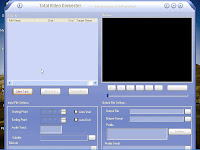
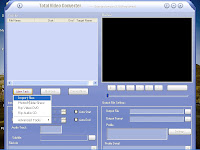
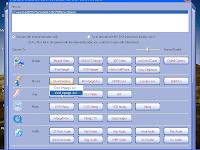
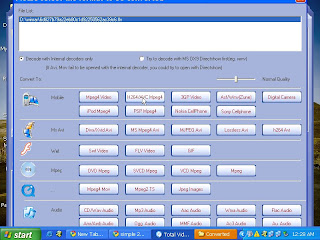
1. Run Total video converter and click on the " New Task " button.
2. Select the " Import File " option.
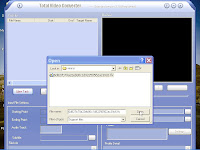
3. Browse and select your video file from your system.
4. Most Important Step : For s60 2nd and 3rd edition devices select Ms avi > Xvid Mpeg4 avi
For Ipod and Nokia 5800 express music ( S60 5th edition ) , select Mobiles > H264 mp4
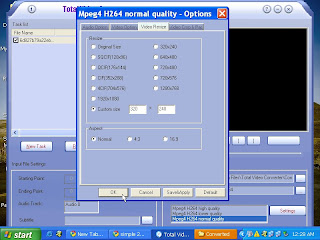
5. Now, click on " Settings " button on bottom right corner. Select the Video Resize Tab > Custom Size > Select/Input the size of your device screen ( 320 x 240 is optimum size).
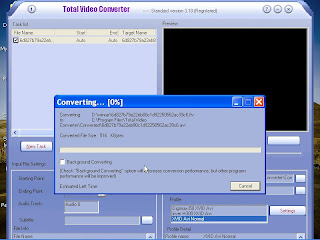
6. Press the " Convert " button and get all your videos reduced to half or less MB's without any loss of quality on your device/gadget.
Simple2Learn Tip : You can check the " Background Converting "option if it takes a lot of your System's Memory.
We can go for tweaking a few options here and there to see what works best for different gadgets. I guess this is enough for one Symbian Monday. Feel free to Disqus.
Posted by
Unknown on Mar 25, 2009
 W
ith the spread of Wifi and people being constantly on the move we frequently access cyber-cafe, computer centre or other public venues. Moreover, with every business turning online and hundreds of web services coming up everyday there is always a fear of breach of security and privacy intrusion.
Today in this " Wednesday Web How To " post we will put this fear to rest in the simple to learn way.
We will look at how to fully equip your USB device ( it can be a 1 GB pen drive or 250 GB external hard disk ) with the necessary Portable Apps so that all we need to do is plug our device, do our stuff and eject the drive when done.
Here are the Simple2Learn steps :
1. Knoppix 6.0 : The best of all the live distros. Just save the bootable image on the portable hard drive and boot if you can . It has everything you need from web browser to office to multimedia players.
2. Portable Google Chrome / Mozilla Firefox : Best option. No need to install. Just keep it on yuor USB device and use it . Feel like being more secure just clear the private data after your session is over.
We will deal with safe browsing in general in the posts to come. In this post let's restrict to portable options.
3. Now, for bloggers and people who do a little more than just social networking on the web, goto
PortableApps.com for all the portable softwares you need. Amazing array of softwares, all free and simple to download.
In Detail :
Leave your views/comments
Posted by
Unknown on Mar 9, 2009
Posted by
Unknown on Feb 28, 2009
In Brief : With the Piratebay case drawing all the attention, I thought it would be apt to discuss Torrent download on Symbian S60 phones (especially on my Nokia N70-1, S60 ver2.6, OS ver8.1). The only software that works and works really great is Symtorrent by AMORG.
Latest version is Symtorrent 1.41
This is how it works, really simple 2 learn !!
Some of its simple yet remarkable features :
- It supports downloading multiple torrents at the same time
- Capable of both downloading and uploading
- Saves the status of your unfinished torrents, so we can resume the downloads
- We can check the status of each file inside a torrent
- Several other statistics and properties during download
- Torrents can be started from the browser
- Selecting the files that are downloaded from multi file torrents is also supported.
For Java ME enabled phones, AMORG has a Mobtorrent client.
Just get a healthy torrent and Symtorrent will amaze you. And yeah, I'm a big fan of Piratebay, though Mininova being my favourite public tracker.
For download links to Symtorrent click below to read more....
In Detail :
AMORG Symtorrent
Posted by
Unknown on Feb 11, 2009
In Brief : Since the start of this year I have been accessing net mostly through my Nokia N70 ( Symbian 60 version 2 OS). Due to very less access to a pc, the only way I could blog was through my mobile. The following mobile browsers have simplified browsing web on mobile to such an extent that now I can do almost anything on the internet which I used to do on a desktop pc.
1. Opera Mini : Latest version is 4.2, though I have been using 4.1 for yhe most part. Key features in simple terms are :
* Landscape view which makes full use of your mobile screen. Mine is a 208x176 pixel screen, so I badly needed this feature.
* Downloading file and images is real easy once we set the right permissions to give it access to memory card.
** To do so open your program browser on the mobile and goto settings to
configure it ( not by opening Opera Mini )
** Then whenever you have to download images on a web page, goto Tools>Page
Information> Download Images and it will list all the images to choose from !!
* It has a mouse functionality which gives you the complete PC experience.
* Also it opens a web page in compressesd form and you can zoom in whatever part of the page you want to view. This is what makes it possible to view any webpage irrespective of whether it has been optimized for mobile.
In the latest 4.2 version they have really simplified browsing Youtube and added a no. of skins !!
2.
Netfront browser : I use it specifically for dowloading large files as it has a Advanced > Focussed_info feature which lets you copy the actual download link which we can paste in the
Fget download manager (with resume functionality) to download the file.
I will be sharing my blogging, uploading, downloading experience and tips in the future posts. Meanwhile " Read More" for download links for the above browsers !!
In Detail :
Opera Mini 4.2
NetFront 3.3 for Symbian60 phones
Posted by
Unknown on Jan 17, 2009
In Brief :
I was surfing net yesterday when I accidently discovered that the homepage of my blog has a pagerank of 2. Last time I played this game it was 0 (a month back I guess). I checked it on a number of credible online tools and google datacenters to verify it's not fake. Hopefully it's not !!
Not sure whether it matters but anyways here is PAGERANK simplified for you.
- Google uses 200 signals ( read "ways") to determine the importance of a web page. The " Google Pagerank Algorithm" which has been patented is one of them. Google bought the rights from Stanford University.
- PageRank reflects Google's view of the importance of web pages by considering more than 500 million variables and 2 billion terms.
- Pagerank is a ranking system from 0-10 where a rank of 10 is the highest.
In simple terms Google takes into account the following two factors :
- No. of backlinks to your page
- The quality/ranks/pagerank of the sites that link to your site. It means that if two pages link to you , one having a Pagerank of 4 and other 2, the Pagerank 4 site's link will carry more weight.
So it's not only the quantity but also the quality of pages that link to you that matter. However my advice will be don't go looking for quality back-links. Instead try networking within your niche without any bias towards higher page-rank sites.
Thanks to all my friends mentioned in the sidebar ("The Chosen Ones" and
Blogcatalog)
For those interested in optimising 'keywords', here is 'keywords' simplified by
Icantinternet.orgIn case you want to fiddle with your site's stats, read more for the best
free online SEO tools....
In Detail :
- RankingToday : Terrific site for complete SEO check-up of your site. Also has a free meta-tag and keyword generator among other tools. Lists the real page-rank and alo the average pagerank across number of Google centers.
- Diagnosticoweb : Easily one of the best online SEO tool. Extensive info is presented in simple manner. You can have all the data on your fingertips !!
- Iwebtools : Amazing array of web tools. Boasts of a host of tools beyond imagination
- Popuri : cool and simple interface. It gives the number of Google Pagerank, Alexa rank and also Google and Yahoo backlinks plus Delicious and Technorati backlinks.
- Linkvendor : This one makes pagerank and SEO comparisons between two or more sites fun. One can check almost everything in detail right from pagerank, social bookmarks, keyword analysis, website speed and more....
Posted by
Unknown on Jan 1, 2009
In Brief : One of my favourite past-time is Downloading flv videos from Youtube, Metacafe and a host of terrific up and coming video streaming sites.
These are what I think the 3 best ways to download online streaming videos as and when you find them on the web.

1. This one works the best for me. I use Internet Download Manager, a download manager as the name suggests. It's USP is it can grab any file (almost) from the web.
- Install IDM (It will integrate with Internet Explorer and Mozilla, not with Chrome)
- Open the IDM
- Click on Options
- Add the extension of file you want in file-type (flv in our case)
- Click OK
Next time you play a video on youtube it will automatically prompt you to download !!
2. You can use the VideoDownloader Extension in Mozilla. Download speed (all other parameters being the same) is slower than the first method. Also you need to keep the browser open and can't resume the download from last postion, unlike in the first case.
3. A no. of sites where you can paste the link to download. My pick is Keepvid.
4. Techcrunch also offers the youtube downloader as widget. You can have it for your blog !!
For a list of such websites, read more....
In Detail : Best sites to download online flv videos.
Posted by
Unknown on Dec 24, 2008
In Brief :

It's christmas time and there is a long list of pending movies and tv-shows. For all you tv/movie addicts out there, here is my list of top 4
blogspot favourites to watch and download tv shows and movies.
4 top tv-series and movie download blogger blogs :
- http://all-about-ngage.blogspot.com/
- http://watchnewmoviesnow.blogspot.com/
- http://www.yourpcmovies.blogspot.com/
- http://episodes-tv.blogspot.com/
To know more read in detail below....
In Detail :
1. http://all-about-ngage.blogspot.com/ : This one is a hot favourite. Get anything from tv shows, movies to mobile videos and softwares for Symbian platform. The site has direct download links as well as files hosted on Netload and Filebase.
2. http://watchnewmoviesnow.blogspot.com/ : Find all the latest movies and tv episodes you missed. The files are hosted on zshare, bitroad and supernovatube. Easy and fast download.
3. http://www.yourpcmovies.blogspot.com/ : This one is for movies. Amazing collection of movies. The good news is a lot of direct downoad links.
4. http://episodes-tv.blogspot.com/ : This one is for your tv needs. Choose from rapidshare, megaupload, netload and filefactory links. 
Merry Christmas !!