More about → Arsenal, Messi, SimpleToLearn : It's a full circle !!
Showing posts with label simple to learn. Show all posts
Home » Posts filed under simple to learn
Arsenal, Messi, SimpleToLearn : It's a full circle !!
Posted by Unknown on Sep 18, 2011
Labels:
arsenal,
EPL,
premier league,
simple to learn,
simple2learn,
simpletolearn
Web Browser war and Javascript Performance !!
Posted by Unknown on Apr 15, 2009
Any discussion on web browsers inevitably centers around how fast web pages load. We keep saying that a particular website loads faster in a particular browser. Let's try to get why this happens.While there are a number of factors that determine the page loading time of a web page, one major factor is Javascript performance.
Blogspot bloggers would have a good idea where this comes from. How often have we discarded a javascript coded widget just because it made it almost impossible for the page to load.
Many a times we place all the Javascript code at the bottom of the page source code in order to enable the rest of the page to load faster.
Blogspot bloggers would have a good idea where this comes from. How often have we discarded a javascript coded widget just because it made it almost impossible for the page to load.
Many a times we place all the Javascript code at the bottom of the page source code in order to enable the rest of the page to load faster.
The importance of Javascript performance for a web browser can be understood simply by the fact that the web browsers have interesting names for their Javascript engines.
Have a look :
Google chrome : V8 , I have been using it a lot. The fact that the addressbar itself serves as Google Search is it's USP for me.
Mozilla Firefox : Tracemonkey My favourite browser, simply because of the amazing add-ons owing to open source.
Opera : Futhark (Carakan is coming ) While it's my lifeline on my symbian mobile, the latest desktop version seems to have a little too much.
Google chrome : V8 , I have been using it a lot. The fact that the addressbar itself serves as Google Search is it's USP for me.
Mozilla Firefox : Tracemonkey My favourite browser, simply because of the amazing add-ons owing to open source.
Opera : Futhark (Carakan is coming ) While it's my lifeline on my symbian mobile, the latest desktop version seems to have a little too much.
Safari : Nitro ( Based on Apple's open source Webkit's Squirrelfish extreme ) hve to try this one. I keep hearing that it's hot !!As far as Javascript performance goes Internet Explorer 8 is a non starter when compared to Firefox or Chrome.
Web apps are the future with Google looking to make everything we have on our desktops available in the browser itself and the browser war has extended to the Javascript arena as the alternatives like Adobe's Flash and Flex are not that practical or easy to implement.
I can see only benefits as faster the Javascript loads better the website performs and more web apps can be added.
Before I end this post just have a look at few of the Javascript coded widgets on this page :
1. Footer : Yahoo Badge, Sitemeter, Label Cloud
2. Blogcatalog and Mybloglog widgets
3. Technorati
4. Disqus's recent comments
There are many others and they need to load faster !!
Labels:
browser,
chrome,
firefox,
internet,
javascript,
simple to learn,
simple2learn
Linux OS : Get to know it !!
Posted by Unknown on Apr 14, 2009
I have been thinking of giving a specific direction to the " Tech Tuesday " posts. We have discussed a number of " well heard but not fully understood " technologies like the one on wifi, dSLR cameras, megapixel and images, touchscreen, netbooks and so on....The big question is what is it we will be discussing then. Let's break the news : It will be Linux OS (atleast for a number of Tuesdays ).

All of us have heard about Linux and many of us might be thinking of trying it or taking a plunge into the world of Linux. But there are a few myths that keep us from doing it.
Linux and Unix : What's the difference ?
Unix is an operating system developed by AT&T in 1969. Official trademark of Unix is with " The Open Group ".
It's a text based ( terminal ) OS and not the graphic based Windows and Macs we are used to.
Linux : Linux is a Unix like OS developed by free and open source software collaboration. Linus Torvalds wrote the original Linux Kernel ( read system files) in 1991 while rest of the utilities and libraries come from GNU OS by Richard Stallman ( hence the name GNU/Linux).
It's cliche but true : Linux is not Unix.
Do we need technical and programming experience to use it ?
No, the Linux distributions ( different versions since it's open source ) now a days like Ubuntu, Fedora, Suse, Debian and the likes comes with graphical user interface ( X window interface ) much like the Windows and Macs and in some cases even better.
Just have a look at the 3d linux desktop

Now it's really commonplace with a number of laptops and desktops coming with Linux distros
The very fact that it's open source ( the source codes are open to public to develop it) means it's updating all the time.
I have been using Fedora Linux (Fedora 4 onwards ) and let me tell you it's a beauty. It's like having a fully customised OS of your own. It's this " control in the hands of user " aspect that makes Linux special.
I also carry with myself Knoppix Linux live CD. Just boot with it into any system and it becomes your own, do your work and get going.
Once you discover the world of Linux, you will be hooked. Much of my Tech Tuesday future posts will be in the direction of getting you hooked to THE OS and simplifying the how to use part.
Labels:
linux,
os,
simple tech,
simple to learn,
simple2learn,
technology
20 best sites for free symbian software : The Symbian Directory !!
Posted by Unknown on Apr 13, 2009
Trying out new softwares is fun on Symbian gadgets. One finds new versions and better alternatives coming up all the time. So I thought of sharing my " Symbian Bookmarks " for free symbian S60 software download.
- getjar : Get both Java as well as symbian applications.
- symbian-freeware : One of my favourites.
- smartsym : Find S60 5th edition (Nokia 5800 expressmusic) softwares !!
- dotsis : Terrific site with forums where we can discuss everything Symbian. Register to post !!
- wapain.net : Another one with S60 v5 softwares. Another one of my picks.
- mobilefan.net : Softwares by category, a well simplified list.
- mobiletopsoft : Find all freewares and shareware.
- my-symbian : Freewares as well as shareware.
- gallery.mobile9 : Cool Interface, community based site. User uploaded.
- soft32.com : Cool interface and some really amazing collection.
- mobiles24 : Another cool site to look for the latest softwares.
- brothersoft : Well known for all your software needs, not only Symbian.
- getsymbian : Large collection of softwares.
- freesymbiansoft : Another great collection.
- symbianstock : Large stock of softwares
- bestsymbian : Good collection !!
The Best Blogspot/Blogger Blogs in this Business :
- http://symbian-free.blogspot.com/
- http://symbiansmartphone.blogspot.com/
- http://symbianism.blogspot.com/
- http://symbian-freeware.blogspot.com/
Tell me if you think I missed out on that one amazing link that would make this directory a more complete list !!
Labels:
download,
free download,
nokia,
s60,
simple symbian,
simple to learn,
simple2learn,
software,
symbian,
symbian monday
5 simple ways to add Social Bookmarks in every post !!
Posted by Unknown on Apr 11, 2009
For most of us bloggers nothing can beat the joy on seeing a post Dugg, Stumbled, faved on technorati or bookmarked in delicious. I missed the Feed count, right.But then I also missed scores of other equally important social bookmarking and networking sites. That's the point, we need to make sure that we don't miss out on anything and at the same time not overdo the whole thing.
Here are some of the simplest and best implementations of Social Bookmarks.
Pick yours ....
1.
We can apply this one at the footer of each post Find it at Smartbloggerz
2.
This is the text version, to go with every post of ours. Find it at TechieBlogger
This is the text version, to go with every post of ours. Find it at TechieBlogger3.
Taller ones, this is a new compilation by MoreTechTips
Taller ones, this is a new compilation by MoreTechTips5. A wonderful and simple to implement widget by Sociofluid
Find another interesting compilation of multiple social bookmaark widgets by EazyCheezy
If you think there are better ways to do this, share and Disqus....
The Best Movies Ever : Make your own list !!
Posted by Unknown on Apr 10, 2009
I just love to do this Friday Movie Post. Yesterday I had a discussion with my friends about whether they can make up their mind as to which is the best movie they have ever seen ( when I say best I MEAN ONE !! ).We often find lists like the " top 10 hollywood movies of all time " or titles like " one movie you must see before you die " ( hope I see a lot more before I do die ).
But then when I try to figure out my pick for the best movie ever I just can't think of 1, not even 5 or 10 ( beyond that my mental reserves get exhausted !! ).
I was looking at my Orkut profile yesterday ( which I created 4 years back and is pretty much unchanged ) and I found that there too I have written " too many to list" in the favourite movie section !!
Many a times while I'm watching a movie I feel this one is going to be the best I have ever seen but a day later when the side-effects have rubbed off I realise it's not.
Tell me your favourite 1, 5 or 10 movies. Atleast that way I will get to see a few more to decide about mine.
Here are some of the best movie lists we can refer to make up our mind :

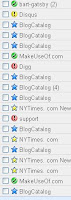
5. New York Times 1000 best ( I guess we can decide on 1000 movies when we see that many !!)
The list of movies I have seen till date. It hasn't been updated for last two months but I guess that's okay.
So, make up your mind and when you do, tell me !!
7 Best Gmail Labs Features : Try Them !!
Posted by Unknown on Apr 8, 2009
Heard about Gmail Labs
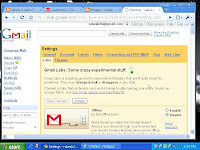
?? I guess many of us haven't. It's the place to test Gmail features being developed and which will be an integral part of Gmail in future.So, why not try them before others do. All we have to do is :
1. Goto Gmail Setting and click on the Labs tab.
2. Enable the Gmail Lab feature we
want and save changes.
want and save changes.As simple as this. In case something goes wrong :
1. Disable the particular Lab feature the same way we enabled it.
2. To disable Gmail Labs completely go here http://mail.google.com/mail/?labs=0.
Here are my picks for the best of Gmail Labs :
1. Title Tweaks by Fedor K
Changes order of elements in the browser title bar from "Gmail - Inbox (20) - rakesh2b@gmail.com" to "Inbox (20) - rakesh2b@gmail.com - Gmail". This way we are able to see if a new mail has arrived even if Gmail window is minimized.
2. Undo Send by Yuzo F
Can you believe it !! We can now stop messages from being sent for a few seconds after hitting the send button. My pick for the best Gmail Lab feature.
3. Superstars by Kai H & Julie W
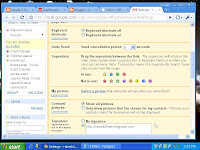
We need to do a few things to get this one right.
Adds additional star icons. After enabling this feature:

1. Go to the "General" Settings page to choose which superstars you wish to use.
2. Use either the keyboard shortcut ('s') or click to rotate through your selected superstars.
3. Use the search
operator "has:" to find all messages with your superstar (e.g. "has:red-bang", "has:blue-star"). Learn the name of a superstar by hovering over its image in the "General" Settings page.
operator "has:" to find all messages with your superstar (e.g. "has:red-bang", "has:blue-star"). Learn the name of a superstar by hovering over its image in the "General" Settings page.4. Pictures in chat by Dave C
We can see our friends' profile pictures when we chat with them.
5. Signature tweaks by Keith C and Dave C
Places our signature before the quoted text in a reply, and removes the "--" line that appears before signatures.
6. Random Signature by Chad P
Rotates among random quotations for our email signature.
7. Location in Signature by Marco B
Appends our location to your signature. We must have your signature enabled.
A signature can be anything from a quote to your website's address which will appear in evry mail you send. To enable it GoTo Gmail Settings, General Tab and type in your Signature.
So, get started. Make your Gmail your own and unique and at the same time contribute to it's development.
Labels:
gmail,
gmail labs,
how to,
how to simply,
internet,
labs,
simple to learn,
simple2learn
12 must have Symbian apps : Review and download !!
Posted by Unknown on Apr 6, 2009
Trying out different apps on a Symbian gadget is really fun. One finds useful and interesting apps being developed all the time. Now with Nokia's acquisition of the Symbian platform rest assured this is the platform of choice ( did somebody say Google Android ?, we'll see when it comes).So , what are the must have apps on a S60 2nd edition device ( or even a 3rd edition one ) :

Browsers : Accessing internet on the go is one main reason of having a smartphone, isn't it? This is how we can get the most out of GPRS ( I just can't wait for the 3G launch for private players) :
- Opera Mini : This is one software I guess all smartphones must have, what with the java version also out there. Landscape browsing and zoom view are it's biggest plus.
- UCWeb Browser : This one comes in Chinese but there is the English translated version by Akushah. Tabbed browsing and in-built downloader with resume capability makes this one really special.
Downloader : What's the point in having an unlimited GPRS plan when you can't download files of larger size. These tools make downloading big files a piece of cake :
- Fget : The ability to resume downloads and work in background make it worth ahving on our device, even though the UCWeb browser with its in-built downloader has really made this one redundant.
- Symtorrent : I have already covered thisone in my earlier post. The only working torrent downloader on Symbian platform. Amazing software to have.
Audio/Video players : Multimedia is what mobile phones are all-about now a days. See how to get the most out of your Symbian gadget with these apps in this post :
- Divx Player : We need to install the xvid codec along with this and play files in avi format in addition to mp4 and 3gp.
- Smartmovie Player : Nothing to separate this from the previous one.
- Mp3 Players : There are quite a few mp3 players. Download these and find which one works for you.
Miscellaneous : Some softwares to make our life easy :
- SFManager : This is a file browser/explorer which makes it easy to browse through files on our memory cards. The native browsing system on these devices can be really frustrating at times.
- Adobe Reader : We know this must have app to go through our pdf files
- Pdf + (mBrain Software): A great lighter alternative to Adobe
- Screenshot ( http://www.rock-your-mobile.com product ): This one is for people like me who like to take a screenshot of their device screen for blogging or other posting purposes.
- Flashlight : A great tool for Nokia N70, to turn your camera flashlight into a torch. It's amazing to see what a powerful torch a N70 is !!
If you have a terrific Symbian app in mind, do Disqus !!
Simple2Learn Quarterly Review : It's pagerank 3 now.
Posted by Unknown on Apr 3, 2009
Simple2learn is a Pagerank 3 blog now, after yesterday's Google Pagerank update. Last update in January saw the blog rise to pagerank 2 from 0 and I did a post to simplify the Google Pagerank technology and how important it is plus a list of my favourite sites to analyse our websites. Take a look.A higher Google Pagerank simply means that the site has been linked to by a good number of sites and it helps a website to rank higher in Google searches done by people across the web.
I strictly believe an overkill of Pagerank and Search Engine Optimisation (SEO) should be strictly avoided as it takes the focus off quality of CONTENT, but at the same time a few simple things done the right way never hurts !!
In this weekend post let's analyse the progress made by Simple2Learn this quarter :
1. Blogcatalog : Blogcatalog and Mybloglog are 2 of the best networking sites for bloggers. While I joined Mybloglog recently in February, I have been a member of Blogcatalog since November when I really started blogging. While my BC score/point has been around a meagre 25 ( primarily because I haven't started many discusions or groups ) I have benefitted a lot as the focus has been on making quality friends and trying to follow each others blogs.
2. Technorati : An amazing search engine for weblogs, tags and keywords. Keep checking what's hot in your niche and how we can discuss about them in our posts. A technorati fave or backlinks has a lot of weight , it seems. I guess Simple2Learn's Technorati authority (backlinks )was 7-8 during last pagerank update and currently it's 16.
3. Digg/Stumbleupon : While I joined the bookmarking and link submission giants Digg and StumbleUpon almost at the sametime when I resurrected my blog in November, I am still discovering them and have started exploring them only now. But I hear they are terrific ways to promote your posts and articles.
4. Google FriendConnect/Followers widget : The best way to show appreciation for a blogger/blogspot blog and connect with fellow bloggers.
5. Feedburner RSS feed : Most people use Google Reader and many other online feed readers or softwares to keep themselves updated on blogs/websites they like. A must for all frequently updated websites.
6. Directory Submission and Indexing: Simple2Learn features in many reputed link submission directories. Most importantly Simple2Learn was submitted to Google directory through Google Webmaster or Google Analytics ( for analysing traffic), in Yahoo's directory through Yahoo Site Explorer and to MSN for indexing.
7. Ping : With so many social networking sitesand other tools mentioned above it's important to let them know of our site's updates. Ping-o-matic is a great tool for pinging most of these at once. But I think it helps to keep logging in most of these wabsites manually and checking their updates and notifying them of ours.
Enjoy your weekend and review your progress.
Labels:
blogger,
google pagerank,
simple to learn,
simple2learn,
technorati
The Friday Movie Post : Al Pacino's 5 best flicks !!
Posted by Unknown
I guess I had to write this one. Everytime I would think of doing a post on movies, I would get stuck on his name. Al Pacino is easily one of the finest actors off all time. In my book he is right up there. Here I would list his 5 performances I loved the most. Let's get started :1. The Godfather II
: Not much to say about this one. I read the book by the same name, a masterpiece by Mario Puzzo, before I saw the trilogy. Pacino as Michael Corleone delivers the performance of a lifetime and earned an Osacar nomination. If there has been a movie close to perfection, it's this one. Might sound exaggarated but tell me how many people haven't seen this one and how many disagree with me !!2. Scent of A Woman
: This one finally earned him an Oscar after 8 nominations. An older Al Pacino is absolutely brilliant in an otherwise low profile movie. Pacino plays the part of Lt. Colonel Frank Slade, a blind and retired army officer and delivers some of the most memorable dialogues. Another out and out Al Pacino flick, though Chris O' Donnell delivers a convincing performance in the role of a prep school student.3. Dog Day Afternoon
: This is one of his lesser known but for many one of his finest. This one will make anyone fall in love with Al Pacino's character Sonny Wortzik if not with the man himself. A comic situation ending on a tragic note, another Oscar nomination that he couldn't convert. John Cazale as Sal, Pacino's partner in crime delivers a performance of his lifetime.4. ...And Justice For All
: Another one that makes it impossible not to love Al Pacino. Pacino as an ethical defence lawyer Arthur Kirkland defending a Judge he despises , is absolutely brilliant in this movie which made a great statement on he American Judicial System of those days, in its own satirical way. Another Oscar nomination.5. Scarface
: No Oscar nominations and yet thiso ne is a legend and one of his most remembered performances. A dark and violent movie starring Al Pacino as Tony Montana, an illegal Cuban immigrant who takes the drug empire by storm. Movie has a lot of profanity, what with almost every dialogue having the forbidden f word, but one for the Al Pacino fans.Those who have watched these are the fortunate ones and those who haven't are still fortunate as they would have the time of their lives when they watch the Pacino Classics.
Pay for Antivirus Protection : You must be kidding !!
Posted by Unknown on Apr 1, 2009
Protecting our PC's from virus, trojans, spyware, malware.... is top on most people's mind. I have seen people getting real paranoid, linking everything wrong with their PC's to a virus problem instead of identifying what's really wrong.I believe we don't really need to pay for antivirus and antispyware. Not for our Personal Computers, though it makes sense for an organization to go for it. Just get the right combination of free antivirus and antispyware installed. We tend to think that free antivirus softwares are not that effective, but....
Believe me, they are really effective and they don't even take a toll on your computer's memory like some of the highly rated antivirus's that cost.
Following are the best free antivirus/ antispyware softwares : A Simple2Learn presentation.
Antivirus
1. AVG antivirus
: I guess it needs no introduction and it's really effective. Just keep it updated.
: I guess it needs no introduction and it's really effective. Just keep it updated.2. Avira antivirus
: Another one that works really well and is really free.
: Another one that works really well and is really free.Antispyware
1. Spybot antispyware
: A very effective spyware and absolutely light on your system.
2. Ad aware antispyware
: Another top of the line free software. You can upgrade it if you want but the free edition is good enough.
: Another top of the line free software. You can upgrade it if you want but the free edition is good enough.Just install one antivirus and one antispyware each and stop fussing. I prefer AVG antivirus with Spybot. Just keep them updated and those of you who have been using the obvious highly rated antiviruses will finally get to feel what it is like to have softwares that don't take all your system's memory.
And yes please remember any antivrus protection is mostly preventive. So there is absolutely no point in cursing the software if we install it after the damage has been done. Install them beforehand : prevention is better than cure ( cliche but so true !! ) .
Labels:
antispyware,
antivirus,
avg,
avira,
computer,
download,
how to,
how to simply,
simple to learn,
simple2learn,
software,
spybot
Know the Digicam : Point and Shoot or dSLR !!
Posted by Unknown on Mar 31, 2009
Digital Camera is one must have gadget. The luxury to go on clicking without worrying about film rolls and everything getting automatically saved on that tiny Memory Card having 1 gb, 2gb or more space is something, really. So, lets try to know the digicam in a Simple to learn way.Basically there are two types of digicam :
1. Point and shoot digital camera : Small and portable camera with Live Preview capabilities and limited motion video features mostly used for taking Snapshots.
.jpg)
2. dSLR (digital single lens reflex) digital camera: The reflex design scheme is a major difference between a dSLR and an ordinary digital point and shoot camera, which typically exposes the sensor constantly to the light projected by the lens, allowing the camera's screen to be used as an electronic viewfinder.

There is also the Bridge / SLR ( Single Lens Reflex ) digicam often confused for a true dSLR Digicam. It has small sensors and Livepreview just like Point and Shoot digicam and shares a few features with dSLR but it's not a true dSLR.
Points on which dSLR digicam scores over Point and Shoot digicam :
1. Optical viewfinders which tend to be more comfortable and efficient, especially for action photography and in low-light conditions.
2. Accurate preview of framing close to the moment of exposure
3. Larger sensors : similar depths of field and picture angle to film formats.
4. Choose from a variety of interchangeable lenses
5. Less shutter lag, faster autofocus systems, and faster frame rates
6. Ability to attach additional accessories. A good dSLR can really be customised.
Now, points on which Point and Shoot digital camera scores over a dSLR digicam:
1. Generally smaller size and weight.
2. Generally lesser cost and if chosen wisely, a great value for money.
3. Few DSLRs with a video mode, while this has become a standard feature of compact digital cameras.
4. Most DSLR models lack live preview on their LCDs, a nearly universal feature among compact digital cameras (many newer DSLRs do offer this).
5. Noisier (audio) operation, due to the SLR mirror mechanism.
6. Small digicams generally can focus on closer objects than typical DSLR lenses.
Simply put, if you really have keen interest in photography go for a dSLR
Also if you have money to splurge and videos are not a priority then go for a dSLR.
On the other hand if you want to strike a balance between cost and performance go for the compact Point and Shoot digicam. There are some real good ones in 6 MP TO 10 MP range. But as I pointed out in last Tuesday's Tech post, Megapixels are not everything.
Simple2Learn Video Convert : Symbian Mobiles and Ipod
Posted by Unknown on Mar 30, 2009
This " Symbian Monday " post is not really an exclusively Symbian post. This one is also for the Ipod and other video freaks who want to convert video to formats that that would run on their gadgets.As I mentioned in last Monday's post, I use Total Video Converter to convert files for my Nokia N70 ( S60 2nd edition ). The process is same for other advanced S60 edition mobiles and Ipod except for few steps.
So here are the Simple To Learn steps :
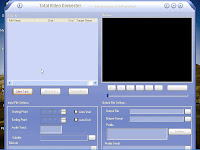
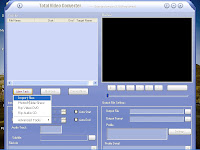
1. Run Total video converter and click on the " New Task " button.

2. Select the " Import File " option.

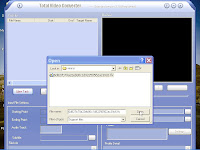
3. Browse and select your video file from your system.

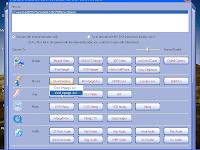
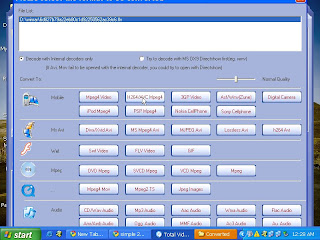
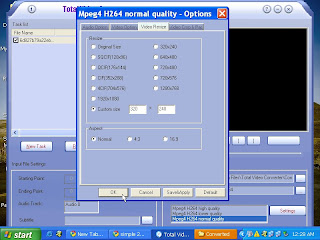
4. Most Important Step : For s60 2nd and 3rd edition devices select Ms avi > Xvid Mpeg4 avi

For Ipod and Nokia 5800 express music ( S60 5th edition ) , select Mobiles > H264 mp4

5. Now, click on " Settings " button on bottom right corner. Select the Video Resize Tab > Custom Size > Select/Input the size of your device screen ( 320 x 240 is optimum size).

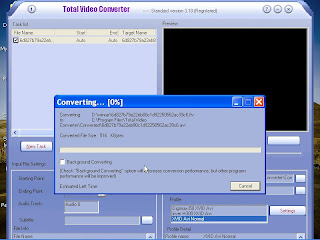
6. Press the " Convert " button and get all your videos reduced to half or less MB's without any loss of quality on your device/gadget.

Simple2Learn Tip : You can check the " Background Converting "option if it takes a lot of your System's Memory.
We can go for tweaking a few options here and there to see what works best for different gadgets. I guess this is enough for one Symbian Monday. Feel free to Disqus.
Labels:
avi,
converter,
gadget,
how to,
how to simply,
ipod,
mp4,
n70,
nokia,
Nokia 5800,
s60,
simple symbian,
simple to learn,
simple2learn,
symbian,
symbian monday,
total video,
video,
xvid


Bigger is better, a